Cài đặt
Cài AutoEasy trên máy Windows 64-bit. Làm lần lượt: cài Visual C++, tải app, giải nén, mở file exe, rồi kích hoạt.
Hiện chỉ hỗ trợ Windows. Nên giải nén app ra ổ D: (hoặc ổ khác C:) để không mất dữ liệu khi cài lại Windows.
Bước 1 — Cài Visual C++ Redistributable
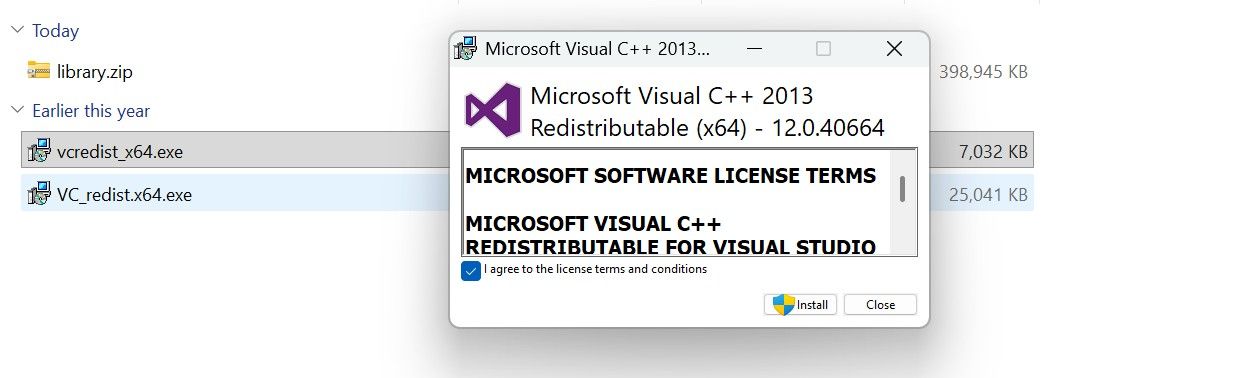
Cài cả hai file. Thiếu một trong hai có thể làm app không mở được.
Gói Redistributable thứ nhất. Tải một nguồn rồi cài.
Tải vcredist_x64 trên Google Drive
Gói Redistributable thứ hai. Cài giống bước trên.
Tải VC_redist.x64 trên Google Drive
- Mở vcredist_x64.exe.
- Tick I agree to the license terms and conditions, bấm Install.
- Lặp lại với VC_redist.x64.exe.
Bước 2 — Tải AutoEasy
Tải file zip, copy sang thư mục cài đặt, rồi giải nén.
Tải AutoEasy trên Google Drive
Windows 11 25H2 đôi khi chặn app khi mở lần đầu (kiểm tra nguồn gốc phần mềm, không phải virus). Tắt Smart App Control: Windows Security → App & browser control → Smart App control → Off.
Bước 3 — Giải nén và mở app
Sau khi tải, bạn có:
vcredist_x64.exeVC_redist.x64.exeAutoeasy_{version}.zip
- Copy file zip vào thư mục muốn cài (ví dụ
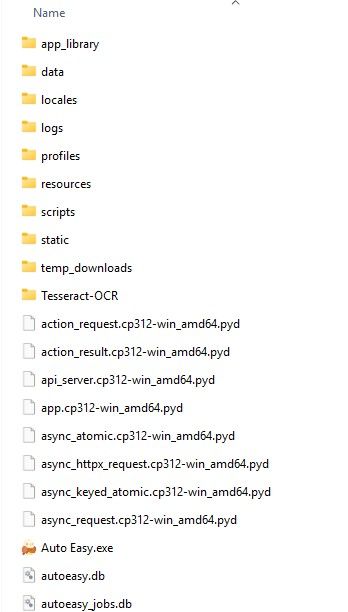
D:\Autoeasy). - Giải nén. Bạn sẽ thấy thư mục Autoeasy.
- Mở Auto Easy.exe.
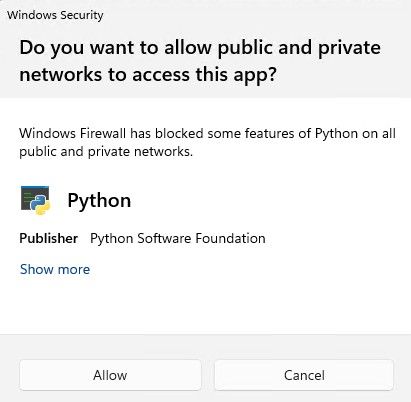
- Nếu Windows hỏi quyền mạng, bấm Allow.
Bước 4 — Dùng thử hoặc kích hoạt giấy phép
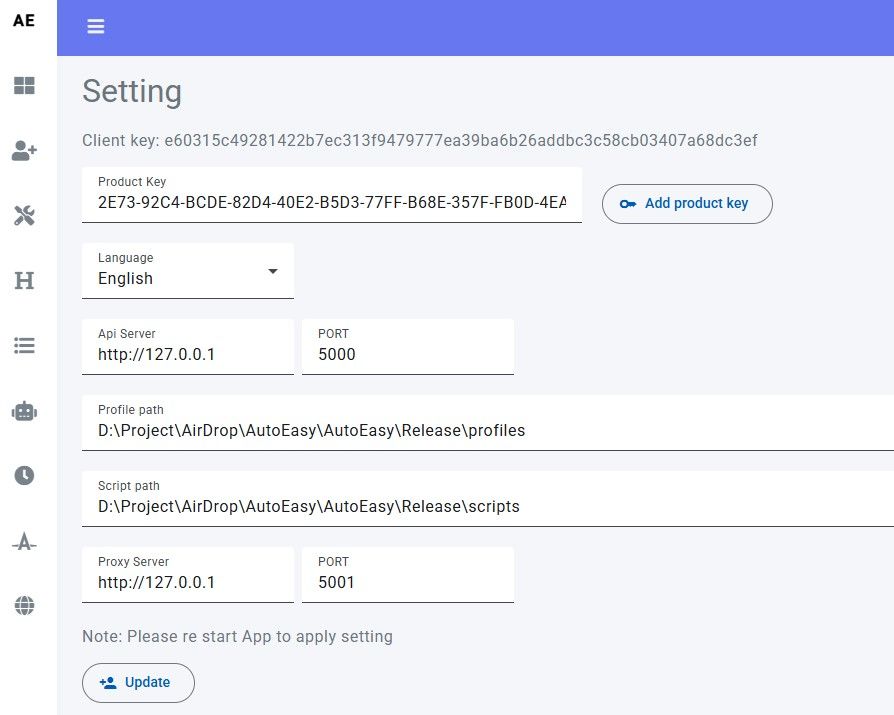
- Trong app, mở Setting. Bấm Trial 15 days / Dùng thử 15 ngày nếu muốn thử 15 ngày.
- Mỗi giấy phép gắn một máy. Đăng ký tài khoản trên website rồi mua gói tại danh sách gói.
- Copy key, dán vào ô Product key, bấm Add product key.
Tùy chọn — Cô lập profile Edge
Nếu máy đã đăng nhập Microsoft / Outlook trên Edge gốc, profile Edge mới có thể tự đồng bộ đăng nhập. Để tách biệt:
- Cách 1 (nên dùng): tạo user Windows local, không gắn Microsoft account.
- Cách 2: cài lại Windows, tạo tài khoản offline.
- Cách 3: đăng xuất hết tài khoản Microsoft trên Edge gốc.
Tạo user local (Command Prompt chạy bằng Administrator):
net user LocalUser * /add
net localgroup administrators LocalUser /add
Khởi động lại, đăng nhập LocalUser. Nếu vẫn tự đăng nhập, xóa profile Edge cũ rồi thử lại cách 1 hoặc 2.
Tùy chọn — Trình duyệt Chromium để load extension
App hỗ trợ trình duyệt nhân Chromium. Để cài extension hàng loạt dễ hơn Chrome gốc, có thể dùng:
- Brave
- Ungoogled Chromium (khuyến nghị)
- Thorium
Chrome hiện phải cài extension trực tiếp trên từng profile, không load từ thư mục. Chi tiết: Extension.
Tùy chọn — Tắt hỏi lưu mật khẩu
Popup lưu mật khẩu hay làm kẹt kịch bản. Cách nhanh: mở Command Prompt (Administrator), chạy từng dòng:
reg add "HKLM\SOFTWARE\Policies\Microsoft\Edge" /v "PasswordManagerEnabled" /t REG_DWORD /d 0 /f
reg add "HKLM\SOFTWARE\Policies\Google\Chrome" /v "PasswordManagerEnabled" /t REG_DWORD /d 0 /f
reg add "HKLM\SOFTWARE\Policies\BraveSoftware\Brave" /v "PasswordManagerEnabled" /t REG_DWORD /d 0 /f
reg add "HKLM\SOFTWARE\Policies\CocCoc" /v "PasswordManagerEnabled" /t REG_DWORD /d 0 /f
Hoặc sửa tay: Windows + R → regedit → HKEY_LOCAL_MACHINE\SOFTWARE\Policies\Microsoft → tạo key Edge nếu chưa có → DWORD PasswordManagerEnabled = 0.
Xong phần cài đặt. Tiếp theo: Tạo group.